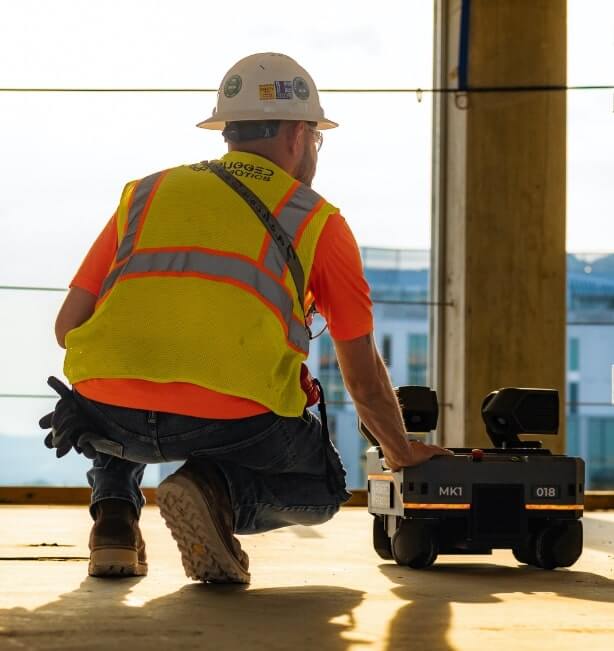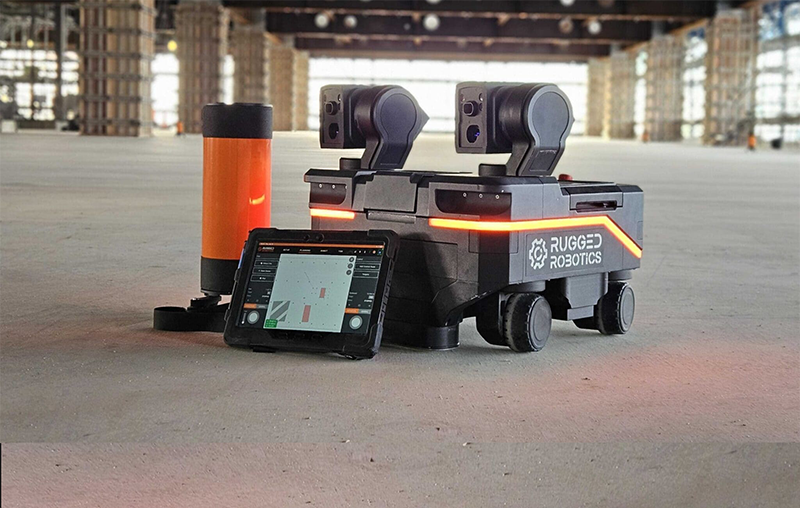
A construction layout printer is a robotic system that transfers coordinated BIM or CAD information directly onto a jobsite surface. Instead of a crew measuring and marking individual points, the printer places lines, equipment outlines, penetrations, labels, symbols, and installation instructions directly where crews need them.
The bigger differences between layout printers are how they locate themselves, what information they can print, who operates the equipment, and who is responsible for getting accurate layout delivered on schedule. This guide walks through each of those, then compares Rugged Robotics, Dusty Robotics, and HP SitePrint side by side. For the broader picture of layout across every method, see our construction site layout guide.
What Is a Construction Layout Printer?
A construction layout printer, also called a robotic layout printer, field printer, floor plan printer, or layout machine, is a mobile robot that prints a coordinated layout file onto the slab. It replaces hand-measured points, chalk lines, and spray paint with a machine-driven pass. Peer-reviewed research, including a 2023 study in the journal Buildings, shows the basic approach: a mobile robot pairs a marking system with a positioning method to turn BIM coordinates into physical marks.
Commercial examples include Dusty Robotics’ FieldPrinter 2 and HP SitePrint, which contractors operate themselves, and Rugged Robotics, which delivers robotic layout as a full-service offering with its Mark1 robots and experienced operators.
How Does a Construction Layout Printer Work?
Every layout printer follows the same basic sequence:
- Prepare the file. The coordinated model is checked and converted into print-ready layout.
- Establish control. The robot is tied to the project’s site control so every mark lands in the right place.
- Position and print. The robot or layout machine drives the floor, continuously locating itself and marking as it goes.
- Verify. Printed layout is checked against control before trades install.
The first two steps are where most layout problems start, and they happen before any robot moves. A model that hasn’t been prepared well or site control that wasn’t set accurately will produce bad layout no matter which printer marks it. The Construction Layout Robot Guide covers how Rugged verifies control before anything is printed.
Does a Layout Printer Need a Total Station?
It depends on the platform. HP SitePrint uses a robotic total station from Leica, Trimble, or Topcon that locks onto a prism on the robot and must keep line of sight while printing. HP even includes a shadowing feature that keeps the robot out of areas where the total station would lose sight of it. Dusty’s FieldPrinter 2 uses a Leica Absolute Laser Tracker instead of a total station. The tracker follows the robot in real time, so it also needs visibility to the robot, and obstructions between the two can interrupt printing.
Rugged takes a different approach. Mark1 doesn’t rely on an external instrument tracking the robot. Rugged’s team places reference targets on project control, and the robot observes those targets as it moves, choosing the most error-tolerant pair to locate itself. Target coverage still has to be planned, and Rugged’s operators handle that during mobilization, but no single instrument has to keep continuous sight of the robot across the floor. For a deeper comparison, see Layout Robot vs. Total Station.
How Accurate Are Construction Layout Printers?
Layout machine manufacturers publish accuracy specifications under defined conditions, such as a specific instrument grade, print mode, and working distance. In the field, results depend on the quality of site control, instrument or target setup, surface conditions, and the operator’s process. Rugged typically delivers layout within 2 to 3 millimeters of verified site control, with Mark1 robots and experienced Rugged operators handling setup and printing. Accuracy matters to buyers, too: it was the most-cited benefit of jobsite robotics in BuiltWorlds’ 2026 benchmarking survey, named by 75% of contractors.
What Can a Layout Printer Print?
Modern layout printers go well beyond wall lines. Depending on the platform, they can print points, arcs, text, symbols, equipment outlines, anchor and embed locations, penetrations, and QR codes. Rugged prints hypervisible layout with bold symbols and multi-line text. On a Hensel Phelps hyperscale data center, Rugged laid out racking baseplates, anchor locations, wall track, HVAC passthroughs, and architectural features, and that added detail helped framers install 15%+ faster.
Can Layout Printers Handle Multiple Trades?
Yes. Leading platforms, including Dusty and Rugged, can print coordinated layout for multiple trades from a single model. The harder part is getting that model coordinated and print-ready. On a government center project for Suffolk Construction, Rugged worked with Suffolk and BIM/VDC firm VIATechnik to establish a coordinated model before deployment, then compressed the layout schedule from 7–8 days per floor to three, a 60% reduction, while cutting rework by 75%+.
Rugged vs. Dusty vs. HP SitePrint: What’s the Difference?
All three print coordinated layout onto the slab. The differences show up in how each robot finds its position and, even more, in who does the work.
| Factor | Rugged Robotics | Dusty FieldPrinter 2 | HP SitePrint |
| Positioning | Mark1 observes a network of reference targets tied to site control; no total station | Leica Absolute Laser Tracker follows the robot | Robotic total station (Leica, Trimble, or Topcon) tracks a prism on the robot |
| Instrument-to-robot line of sight | Not required; the robot observes targets placed by Rugged’s team | Required; obstructions can interrupt printing | Required; shadowing feature steers the robot away from blind spots |
| Accuracy | Typically 2–3 mm of verified site control, delivered by Mark1 robots and experienced operators | Published spec under manufacturer-defined conditions | Published spec in HP’s high-accuracy configuration |
| What it prints | Detailed, multi-trade, installer-ready layout with bold symbols and multi-line text | Multi-trade model printing with text, symbols, labels, and QR codes | CAD-driven lines, points, arcs, text, and floor deviation marks |
| Delivery model | Full service: Rugged preps files, mobilizes, sets up control, and prints | Usage-based platform (robot, tracker, software, support); onsite training for your operator | Pay-as-you-go subscription; operated by your field team |
| What your team manages | Coordinated model, priorities, and scope approval | Operator staffing, file prep, tracker setup, and print runs | Operator staffing, file prep, total station setup, and print runs |
Do You Buy a Layout Printer or Hire a Layout Service?
Equipment platforms like Dusty and HP SitePrint are offered on usage-based or subscription terms, with your team running the robot. A full-service provider like Rugged prices layout per project and brings the operators. A layout machine pays off when you keep it busy and keep trained operators available across projects; full service removes the utilization, training, and troubleshooting risk. Here’s why we say don’t lease that robot.
When Does a Full-Service Layout Provider Make More Sense?
The right approach depends on more than printer specifications. The real question is who will own execution.
Contractors that want to build an internal robotic layout capability may prefer equipment they operate themselves. That means maintaining the workflow, preparing files, training operators, coordinating mobilizations, and keeping the system productive as field conditions change.
Rugged takes a different approach. The customer’s VDC team provides the models in whatever formats they exist in. Rugged assists with coordination, prepares the layout, mobilizes the field capacity the schedule requires, verifies site control, and delivers installer-ready information directly on the slab. There is no robot for the project team to learn, store, schedule, or troubleshoot.
That difference matters most on data centers, automated warehouses, and complex industrial projects, where hundreds of thousands of square feet, dense multi-trade information, and aggressive installation windows make layout an execution problem rather than an equipment decision. On a 250,000+ sq. ft. hyperscale project with Hensel Phelps, Rugged’s detailed layout helped framing crews install 15%+ faster while freeing up more than 750 hours of physically demanding layout work. And for a leading warehouse automation company, Rugged scaled across 20+ operational warehouses, peaking at eight simultaneous sites and finishing at least 20% faster than initially scheduled.
What Should You Look For When Evaluating a Layout Printer?
Interest in the category is climbing fast: 79% of general and specialty contractors reported using jobsite robotics in 2026, more than double 2025’s 29%, according to BuiltWorlds’ 2026 Annual Equipment & Robotics Benchmarking Report. Before you choose a field printer or layout service, ask:
- Positioning and setup: What instrument or targets does it need, and how do obstructions affect printing?
- Field accuracy: What results has it delivered on projects like yours, measured against verified site control?
- Print content: Can it print everything your installers need, including symbols, text, and multi-trade detail?
- File prep: Who turns the coordinated model into print-ready layout, and who catches problems before they reach the slab?
- Staffing and capacity: Who operates the robot, and can the provider scale to more crews or sites when the schedule compresses?
- Proven outcomes: Can the provider show measured installation and schedule results, not just square footage printed?
Frequently Asked Questions
Is a layout printer the same as a field printer or layout machine?
Yes. “Layout printer,” “layout machine,” “field printer,” and “floor plan printer” all describe the same category of equipment. “Field printer” is usually refers to Dusty Robotics’ FieldPrinter, one example of a layout printer; HP SitePrint is another.
Does Rugged make a layout printer?
Yes. Rugged’s Mark1 robot does the core job of a layout printer: it reads a coordinated file and prints layout onto the floor. The difference is delivery. Rather than handing your team equipment to run, Rugged delivers layout as a full service across general construction and advanced facilities: its team preps the files, mobilizes, sets up reference targets, and prints, so your crews get installer-ready layout on the slab.
Key Takeaways
- A construction layout printer, also called a layout machine or field printer, transfers coordinated BIM or CAD information directly onto the slab. Dusty’s FieldPrinter 2 and HP SitePrint are two well-known examples.
- HP SitePrint relies on a robotic total station and Dusty on a Leica laser tracker; both need line of sight between the instrument and the robot.
- Rugged’s Mark1 robots locate themselves from reference targets tied to site control, and Rugged typically delivers layout within 2 to 3 mm of verified control.
- Multi-trade printing is available on leading platforms. The bigger difference is who preps the model, runs the robot, and owns delivery.
- Equipment platforms put operators, setup, and file prep on your team; Rugged delivers installer-ready layout without adding headcount.
The Printer Matters. Execution Matters More.
Accurate marks only create value when the right information reaches the floor at the right time and installers can act on it immediately. For teams building complex facilities at scale, Rugged combines detailed robotic layout with the people, preparation, and surge capacity required to deliver it reliably.
See how full-service layout works on your next project.