Construction site layout is the fieldwork of translating a project’s coordinated design into physical marks, lines, points, and labels on the actual slab or deck so crews know exactly where to build. Projects handle that translation in one of four ways: manual layout with tape and chalk lines; layout built around a robotic total station (RTS) for spot points and verification; instrument-tracked field printing, like Dusty Robotics’ FieldPrinter 2 (tracked by a laser tracker) or HP SitePrint (tracked by a robotic total station), which print full layouts from a file; or full-service robotic layout, where a provider like Rugged Robotics prints from the coordinated model with robots that locate themselves from reference targets tied to site control. The right choice depends on project size, how many trades overlap, how tight the tolerances are, and who on the project will own execution.
This guide is for project managers, VDC leads, and field superintendents deciding how to handle layout on a multi-trade project. It breaks down all four methods, compares them on accuracy, setup time, and labor requirements, and outlines which approach fits which type of job.
What Is Construction Site Layout?
Construction site layout is the process of establishing accurate reference points, lines, and markings on a jobsite so trades can build to the design without guessing.
Every project needs it: walls need to land where the drawings show them, MEP penetrations need to hit their coordinates, and equipment pads need to sit exactly where the model says. Layout is the step that turns a coordinated design into something a crew can physically measure from. Skipping or rushing it is one of the most common sources of field rework, covered in more detail in Cost of Rework in Construction.
Manual Construction Site Layout: Tape, Chalk Lines, and Hand Calculations
Manual layout means a crew member measures from a known reference using a tape measure, then marks the result with chalk lines, paint, or nails. References can be physical objects, control lines, or control points.
It’s the oldest method on any jobsite and still the most common one for simple, low-density scopes. Its limits show up fast on complex projects. Every measurement depends on the person taking it, errors compound across a large slab, and multi-trade coordination has to happen in someone’s head or on a printed drawing rather than in the marks themselves. That dependency on skilled, available labor is a growing constraint. The construction industry needed roughly 349,000 net new workers in 2026 to keep up with demand, according to Associated Builders and Contractors data reported by Construction Dive. A large share of that demand is being driven by retirements among the experienced tradespeople manual layout depends on.
Robotic Total Station (RTS) Layout
RTS-based layout uses a robotic total station to track a prism mounted on a marking tool, converting model coordinates into field points without manual measurement.
An operator carries or walks the marking tool while the total station, set up at a fixed position with a clear sightline, continuously confirms its location and guides it to each coordinate. This removes most manual measurement error for point-by-point work like column checks, control verification, and spot layout. It does introduce its own dependency: the total station needs an unobstructed sightline to the tool at all times. That sightline can be difficult to maintain around columns, partial walls, or other trades’ equipment. All layout performed with the total station also needs to adhere to good survey fundamentals in order to remain accurate, adherence to which can depend heavily on the operator.
Some platforms put a print head on a robot tracked by an external instrument, marking full layouts instead of single points (see Instrument-Tracked Field Printing below). For a deeper look at how these approaches compare to target-based platforms, see Layout Robot vs. Total Station.
Instrument-Tracked Field Printing: Dusty Robotics and HP SitePrint
Some platforms pair a print head with an external tracking instrument, turning single-point tracking into a full, model-driven printing system. HP SitePrint uses a robotic total station from Leica, Trimble, or Topcon that locks onto a prism on the robot. Dusty Robotics’ FieldPrinter 2 uses a Leica Absolute Laser Tracker instead of a total station. In both cases the instrument follows the robot as it moves, and the robot prints lines, labels, and symbols from a coordinated file instead of a person marking one point at a time.
This closes the manual-marking gap that RTS layout still has, but it keeps the core dependency: the instrument has to keep line of sight to the robot, and obstructions between the two can interrupt printing. HP includes a shadowing feature that keeps the robot out of areas where the total station would lose sight of it, and SitePrint can also record floor deviations. Both platforms support multi-trade printing from a coordinated file. On both, the contractor’s own trained operator typically runs the robot: Dusty on usage-based terms with onsite training, HP on a pay-as-you-go subscription.
For a side-by-side comparison of Rugged, Dusty, and HP SitePrint, see What Is a Construction Layout Printer?
Full-Service Robotic Layout: Target-Based Localization
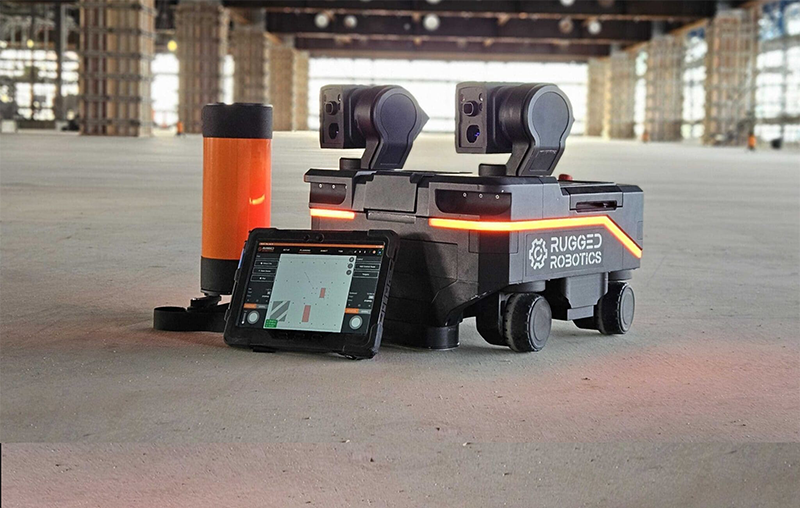
Rugged’s Mark1 robot locates itself from a network of reference targets tied to site control, rather than being tracked by an external instrument, then prints layout from the coordinated model directly onto the slab. Rugged delivers it as a full service: its team preps the files, mobilizes, sets up targets, and prints.
Rugged’s workflow runs in five steps:
- Prepare the layout file from the coordinated model.
- Coordinate the scope with project teams.
- Verify the file against the site’s control network.
- Mobilize Rugged’s robots and operators and print the approved layout.
- Check the printed marks and hand off to trades.
The first three steps are where most layout problems start, and they happen before any robot moves. A model that hasn’t been prepared well or site control that wasn’t set accurately will produce bad layout no matter which method marks it. The Construction Layout Robot Guide covers how Rugged verifies control before anything is printed.
Rugged delivers this as a full service across general construction and advanced facilities, including MEP, drywall, and equipment or automation layout. That includes sleeves, hangers, and penetrations for MEP; wall lines, openings, and frame details for drywall; and equipment outlines, baseplates, and fiducials for automation systems. On a multi-trade renovation for Turner Construction, Rugged printed walls, doors, and multiple MEP systems in a single pass from one network of verified control points. Rugged typically delivers layout within 2 to 3 millimeters of the verified site control network, with Mark1 robots and experienced Rugged operators handling setup and printing, though results still depend on control quality, slab condition, and model integrity.
Unlike RTS-based layout or instrument-tracked field printing, no external instrument has to keep continuous sight of the robot across the floor. The robot observes targets and chooses the most error-tolerant pair to locate itself. Target coverage still has to be planned, and Rugged’s operators handle that during mobilization.
None of this removes the need for experienced field teams. Rugged pairs its robots with its own layout professionals and operators, who work with the project’s survey team to verify control, manage quality, and interpret site conditions as they change. The customer’s VDC team provides the models in whatever formats they exist in. Rugged assists with coordination, prepares the layout, mobilizes the field capacity the schedule requires, verifies site control, and delivers installer-ready information directly on the slab.
The results show up in the schedule. On a government center project for Suffolk Construction, Rugged compressed layout from 7–8 days per floor to three, a 60% reduction, while cutting rework by 75%+. On a 250,000+ sq. ft. hyperscale data center with Hensel Phelps, detailed layout helped framing crews install 15%+ faster. For Brogoitti Construction on a 44,000 sq. ft. manufacturing facility, Rugged printed 3,000+ equipment marks in four days, cutting the installation timeline from 8 weeks to 2. And for a warehouse automation rollout across 20+ active warehouses, Rugged’s team supported as many as 8 sites at once without disrupting live operations.
Construction Site Layout Methods Compared
Positioning is the most visible technical difference between these four methods. The bigger decision is who owns execution: who preps the file, runs the equipment, and delivers installer-ready layout on schedule.
| Factor | Manual Layout | RTS-Based Layout | Instrument-Tracked Field Printing (Dusty, HP SitePrint) | Full-Service Robotic Layout (Rugged) |
|---|---|---|---|---|
| Positioning | Tape measure from a physical object (e.g., column), control line, or control point | External total station tracking a prism | External instrument tracks the robot: Leica laser tracker (Dusty) or robotic total station (HP) | Robot observes reference targets tied to site control |
| Setup dependency | None, but fully dependent on operator skill | Needs a clear, continuous sightline to the total station | Instrument needs line of sight to the robot; obstructions can interrupt printing | No instrument-to-robot line of sight; Rugged’s team plans target coverage |
| Typical accuracy | Varies widely by operator and conditions | High when the total station holds a stable view | Published specs under manufacturer-defined conditions | Typically 2–3 mm of verified site control, delivered by Mark1 robots and experienced operators |
| Trade coverage per pass | One trade at a time, manually coordinated | One point at a time, operator-driven | Multi-trade printing from a coordinated file | Multiple trades printed from one coordinated file |
| Labor requirement | High; scales directly with layout volume | Moderate; still needs an operator per session | Your team staffs a trained operator, preps files, and sets up the instrument | Rugged’s team preps files, sets up targets, and prints; your team supplies models and approves scope |
| Delivery model | Your crew or layout sub | Your operator or survey sub | Usage-based (Dusty) or pay-as-you-go subscription (HP); operated by your team | Full service, priced per project or per day |
Why Verified Data Matters as Much as the Method
Layout errors trace back to the same root cause industry-wide: inconsistent or unverified data reaching the field.
Construction Dive reported in March 2026 that data quality is a familiar constraint on jobsite robots and automation: the tools are only as reliable as the information behind them. Anthony Hartke, VDC director at Turner, described a project where a general contractor’s model was used without validation, leading to widespread layout problems. “We had a bad experience with a certain GC, didn’t check anything, and just took our model wholesale, all kinds of problems with layout,” he said, in comments reported by Construction Dive. That’s precisely the failure mode a verification step against the site control network is designed to catch before anything gets printed. Getting inputs right matters more as adoption grows: 79% of general and specialty contractors reported using jobsite robotics in 2026, up from 29% in 2025, according to BuiltWorlds’ 2026 Annual Equipment & Robotics Benchmarking Report.
Choosing the Right Construction Site Layout Approach
The right method depends on project size, trade density, tolerances, and whether your team wants to run layout equipment itself or hand execution to a full-service provider.
Simple, single-trade, low-volume scopes can often get by on manual layout without a meaningful cost penalty. Projects with overlapping trades, tight tolerances, or a high volume of repetitive layout, like data centers and other automated facilities, benefit most from RTS-based layout, instrument-tracked field printing, or full-service robotic layout, where the accuracy and coordination gains compound across every additional trade and floor. See the full mechanism behind Rugged’s approach in the construction layout robot guide.
Frequently Asked Questions
What is construction site layout?
Construction site layout is the process of marking accurate reference points, lines, and labels on a jobsite so trades can build to the design. It can be done manually, with a robotic total station, with an instrument-tracked field printer like Dusty Robotics’ FieldPrinter 2 or HP SitePrint, or through a provider like Rugged Robotics that delivers robotic layout as a full service across general construction and advanced facilities.
What’s the difference between manual layout and a layout robot?
Manual layout relies on a person measuring from a control point with a tape measure and marking the result by hand. A layout robot instead prints layout from a coordinated model, positioning itself against site control rather than relying on hand measurement.
How do field printers like Dusty and HP SitePrint differ from a robotic total station?
A robotic total station (RTS) on its own only tracks a prism so an operator can mark one point at a time by hand. Field printers like HP SitePrint and Dusty Robotics’ FieldPrinter 2 put a print head on a robot that an external instrument tracks (a robotic total station for HP, a Leica laser tracker for Dusty), so they can mark full lines, labels, and symbols from a file. Both still need line of sight between the instrument and the robot.
How accurate is robotic construction site layout?
Manufacturers publish accuracy specs under defined conditions, such as instrument grade, print mode, and working distance. In the field, results depend on control quality, slab condition, and model integrity. Rugged typically delivers layout within 2 to 3 millimeters of verified site control, with Mark1 robots and experienced Rugged operators.
Does a layout robot replace field crews?
No. Layout robots handle the repetitive marking and measuring work, but people still verify control, manage quality, and interpret site conditions. With a full-service provider like Rugged, those layout professionals and operators come with the robot, so your crews stay focused on installation.
Should you buy a field printer or hire a layout service?
It depends on who you want owning execution. Equipment platforms like Dusty and HP SitePrint are offered on usage-based or subscription terms, with your team staffing the operator, prepping files, and setting up the instrument. That pays off when you can keep the robot busy and trained operators available across projects. A full-service provider like Rugged prices layout per project and brings the robots, operators, and file prep, removing the utilization, training, and troubleshooting risk. Here’s why we say don’t lease that robot.
Key Takeaways
- Construction site layout can be done four ways: manual, RTS-based, instrument-tracked field printing (like Dusty Robotics’ FieldPrinter 2 or HP SitePrint), or full-service robotic layout (like Rugged Robotics).
- Manual layout depends entirely on operator skill and available labor, a growing constraint given the 349,000 net new workers the industry needed in 2026.
- RTS-based layout removes manual measurement error for single-point work but requires a continuous, unobstructed sightline to the total station.
- Field printers like HP SitePrint (robotic total station) and Dusty’s FieldPrinter 2 (Leica laser tracker) print full layouts from a file, but both need line of sight between the instrument and the robot, and your team runs them.
- Rugged’s Mark1 robots locate themselves from reference targets tied to site control, and Rugged’s team typically delivers layout within 2–3 mm of verified control.
- The bigger decision is who owns execution: equipment platforms put operators, setup, and file prep on your team, while a full-service provider delivers installer-ready layout without adding headcount.
- Unverified data, not the robot itself, is a common source of layout problems, which is why file prep and control verification matter as much as the printer.
Curious which layout approach fits your next project? See how full-service layout works.